The seven sizes and their shapes
Our canvas prints come in seven sizes, from 8 × 8 to 24 × 36 inches, in a 0.75 inch or a 1.5 inch wood frame depth, horizontal or vertical. Grouped by shape, they line up with the photos most people already have.
| Canvas size | Shape | Suits photos shot at | File with wrap | Pixels for a sharp print |
|---|---|---|---|---|
| 8 × 8 in | Square, 1:1 | Square crops | 9.755 × 9.755 in | 2927 × 2927 at 300 ppi |
| 12 × 12 in | Square, 1:1 | Square crops | 13.755 × 13.755 in | 4127 × 4127 at 300 ppi |
| 8 × 12 in | 2:3 | 3:2, common on cameras | 13.755 × 9.755 in | 4127 × 2927 at 300 ppi |
| 16 × 24 in | 2:3 | 3:2, common on cameras | 25.755 × 17.755 in | 7727 × 5327 at 300 ppi |
| 24 × 36 in | 2:3 | 3:2, common on cameras | 37.755 × 25.755 in | 5664 × 3864 at 150 ppi |
| 12 × 16 in | 3:4 | 4:3, common on phones | 17.755 × 13.755 in | 5327 × 4127 at 300 ppi |
| 16 × 20 in | 4:5 | A crop from 4:3 or 3:2 | 21.755 × 17.755 in | 6527 × 5327 at 300 ppi |
The pixel figures are our guidance for a sharp result at each size, and they are the same numbers shown in the file setup on the product page. Notice that the largest size asks for fewer pixels than the 16 × 24. Our guidance drops from 300 to 150 pixels per inch once the long side passes 24 inches, because a piece that size is seen from further away.
Sizes you may be looking for
Search for canvas sizes and you will see 8 × 10, 11 × 14 and 18 × 24 on many size charts. Those are traditional photo and frame sizes, and they are not among the seven we list, so here is where each one lands.
An 8 × 10 is a 4:5 shape, the same shape as our 16 × 20 at twice the size. A photo cropped for 8 × 10 moves up to 16 × 20 without any further crop, provided it has the pixels in the table.
An 11 × 14 sits between two of our shapes. It is a little wider than 3:4 and a little narrower than 4:5, so a photo cropped for it will lose a thin strip on the long sides at 12 × 16 or on the short sides at 16 × 20. Go back to the original photo and crop to the canvas shape rather than cropping a crop.
An 18 × 24 is 3:4, the same shape as our 12 × 16. If you want something bigger in a 3:4 shape, 16 × 20 is the next step up, with a small crop to 4:5.
The wrap: why the file is bigger than the canvas
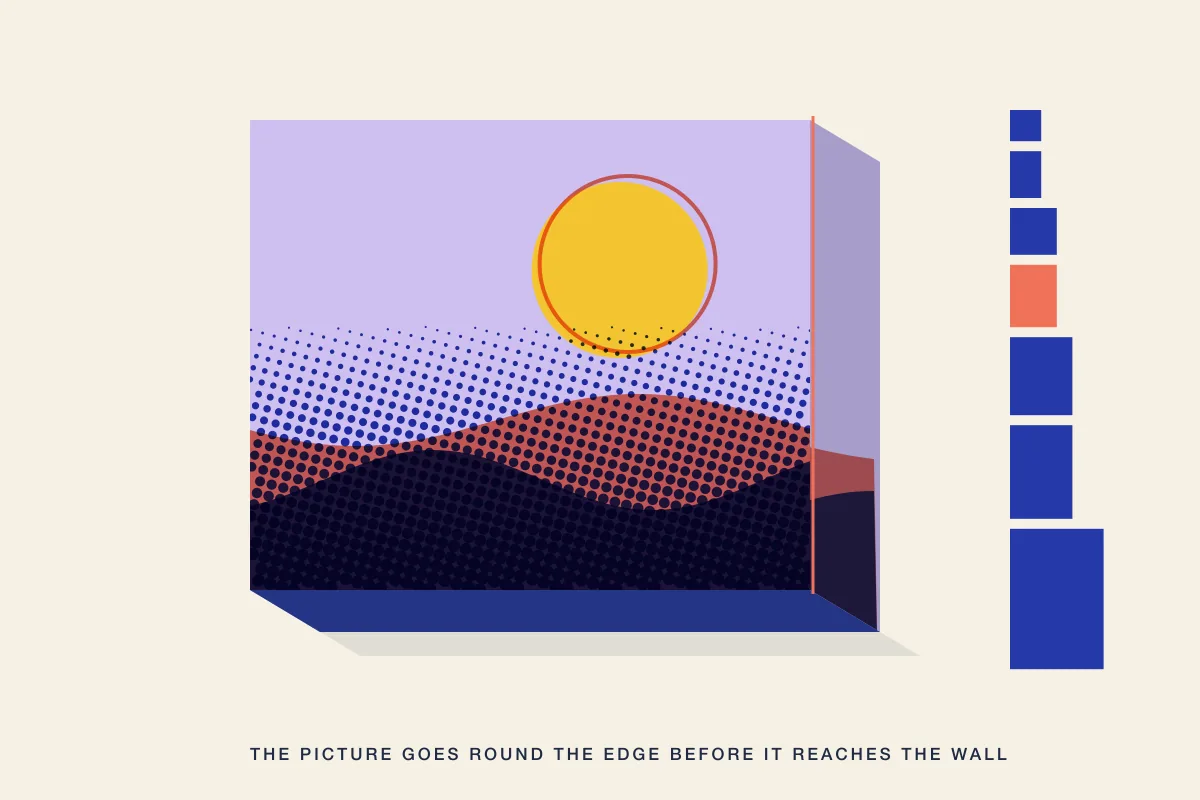
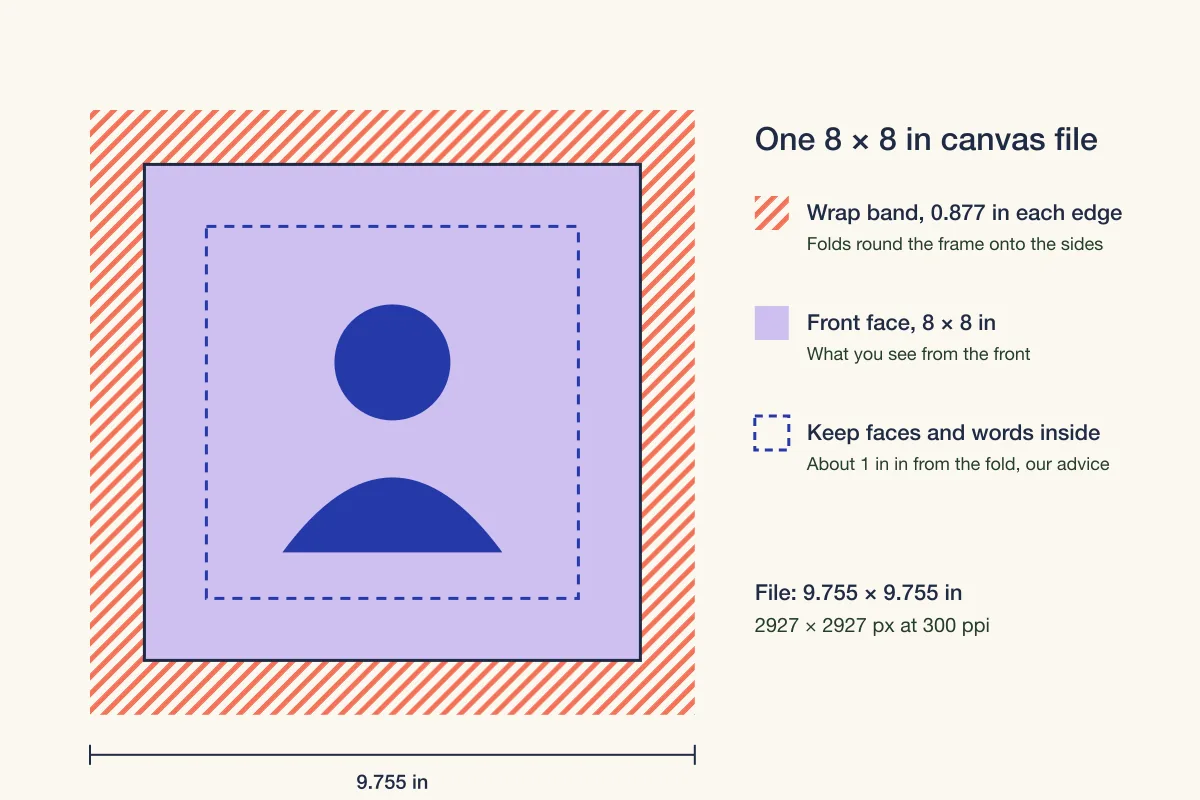
The file setup on record for every canvas size adds 0.877 inch on each edge. That band is the wrap: it folds round the frame and covers the sides, so the picture continues past the front face. An 8 × 8 canvas therefore starts as a 9.755 inch square file, and only the middle 8 inches face the room.
Two things follow. First, anything in that outer band ends up on the side or the back edge, not on the front. Second, the area just inside the fold sits right at the edge of the front face, where the eye reads it as border. Our advice is to keep faces, names and any lettering about an inch in from the fold, which is the dashed box in the drawing.
Depth matters too. The 1.5 inch depth stands out from the wall on its own, and the 0.75 inch depth is slimmer and is the one that can take an optional black, white or walnut frame. With the deeper frame, more of the side is visible, so give the subject more room. Either way, check the wrap preview in the Studio on every side before you order; if you want a finished edge instead, look at framed canvas prints.
Match the size to the photo, not the other way round
Cropping is where most canvas disappointments start, so begin from the photo you have.
A typical 12 megapixel phone photo is 4,032 × 3,024 pixels, a 4:3 shape. Its natural canvas is 12 × 16. Across that file, which is 17.755 inches wide with the wrap, it gives about 227 pixels per inch, below our 300 guidance for that size. If you have a higher resolution original, send that instead. If you do not, a square crop of the same photo has 3,024 pixels on a side, which is enough for an 8 × 8 at full guidance.
A 24 megapixel camera file of 6,000 × 4,000 pixels has the 3:2 shape of the 8 × 12, 16 × 24 and 24 × 36 sizes. On a 16 × 24 it gives about 233 pixels per inch across the file. On a 24 × 36 it clears the 150 guidance with room to spare. In this case the bigger canvas is the more comfortable one.
To check your own file, divide its pixel width by the file width in the table, or use our guide to convert pixels to print size. Then run it through the print resolution checker before you order. If you must crop, crop to the canvas shape yourself so you choose what is lost; the steps in our guide on how to crop a photo for poster printing work the same way for canvas.
Choosing a size for the wall
Measure the space before you choose, then mark the size on the wall with painter's tape and look at it from where you will usually stand. A canvas that seemed large on screen often looks modest on a real wall.
- One canvas on its own: the larger sizes and the 1.5 inch depth make a single piece that holds a wall.
- A pair: two canvases of the same size and shape, side by side with an even gap, read as one composition.
- A grid: square sizes group cleanly, so four 8 × 8 or 12 × 12 canvases in a block work well for a series.
- A shelf or a narrow wall: the 8 × 8 and 8 × 12 sizes, or a tabletop alternative such as an acrylic photo block or a framed print, compared in our guide to that choice.
For a sense of how resolution, size and viewing distance interact on other photo gifts, see photo resolution for photo gifts.
Light, and how long it looks new
A canvas print is still a print, and prints respond to light. Library of Congress guidance on caring for works on paper recommends minimal exposure to all kinds of light and no direct or intense light for material you want to keep. Hang a canvas you care about out of direct sun, and it will keep its color for longer.
Before you order
- Pick the canvas shape that matches your photo: square, 2:3, 3:4 or 4:5.
- Check the pixels against the table, using the file size with the wrap.
- Keep faces and words about an inch in from the fold.
- Choose the depth: 1.5 inch to stand alone, 0.75 inch to add a frame.
- Look at the wrap preview on every side.
- Send the highest resolution original you have, never a social media download.
- Hang it out of direct sunlight.
Frequently asked questions
What sizes do canvas prints come in?
Our canvas prints come in seven sizes: 8 × 8, 12 × 12, 8 × 12, 12 × 16, 16 × 20, 16 × 24 and 24 × 36 inches, horizontal or vertical, in a 0.75 inch or 1.5 inch wood frame depth, with an optional black, white or walnut frame on the 0.75 inch depth.
How much of my photo wraps around the edge of a canvas?
The file setup on record adds 0.877 inch on every edge, and that band folds round the frame onto the sides. An 8 × 8 canvas starts as a 9.755 inch square file. Keep faces and lettering about an inch in from the fold so nothing important lands on the edge.
What size canvas fits a phone photo?
Most phone photos are 4:3, which matches the 12 × 16 canvas without cropping. A 12 megapixel photo of 4,032 × 3,024 pixels gives about 227 pixels per inch across that file, below our 300 guidance, so send a higher resolution original if you have one, or crop square for an 8 × 8.
What resolution does a canvas print need?
Our guidance is 300 pixels per inch measured across the file with the wrap for sizes up to 24 inches on the long side, and 150 for larger, because big pieces are seen from further away. That works out to 2927 × 2927 pixels for an 8 × 8 and 5664 × 3864 for a 24 × 36.
Sources & specification notes
The references below support the relevant technical or product details in this guide. Examples and checklists are not claims of practical testing or universal production requirements. Confirm the current specifications for your chosen product before production.
- Library of Congress: Care, handling and storage of works on paper
Recommends minimal exposure to all kinds of light and no direct or intense light for material you want to keep.
- Voqado: Canvas prints specifications
Seven sizes from 8 × 8 to 24 × 36 inches, 0.75 or 1.5 inch wood frame depth, optional black, white or walnut frame, and a file setup of 0.877 inch wrap on every edge with pixel guidance per size.