Light adds, ink subtracts
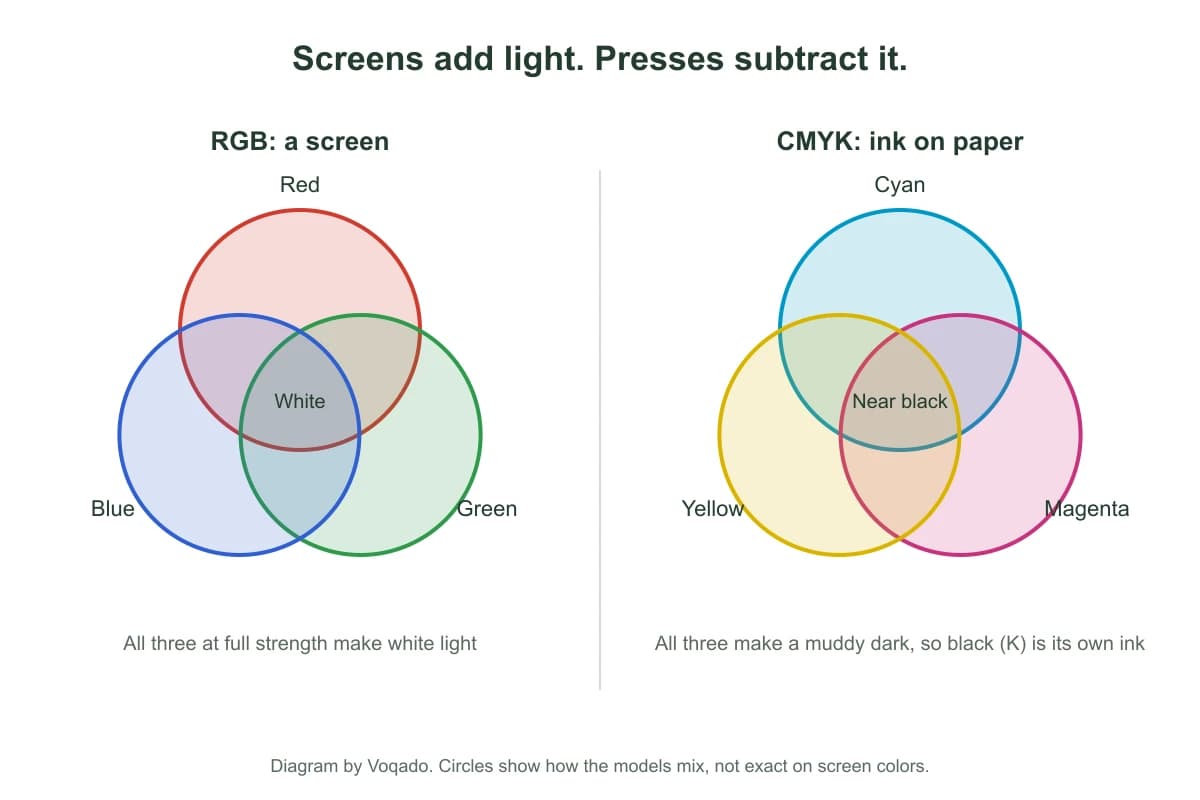
A screen starts black and adds light. Red, green and blue at full strength give white, and a phone or laptop can push saturated colors because it is a light source. Paper starts white and every layer of ink takes light away. Cyan, magenta and yellow together should make black, but in practice they make a muddy dark brown, which is why black (the K in CMYK) is a fourth ink of its own.
The range of colors a device can show is its gamut. A typical screen gamut is wider than the gamut of four color ink on paper, especially in bright greens, blues and oranges. The U.S. Government Publishing Office guidelines describe RGB as device dependent display color and warn that converting RGB to CMYK causes a color shift. Nothing is wrong with your file when that happens. It is physics, and the only question is where the shift lands.
Which colors move when RGB becomes ink
| On screen | What usually happens in ink | What to do |
|---|---|---|
| Electric blue, violet | Prints duller and slightly purple or gray | Pick a deeper blue you can live with on paper |
| Neon or lime green | Loses its glow, can turn olive | Avoid relying on glow for legibility |
| Bright orange, hot pink | Calmer and less saturated | Check contrast with text on top |
| Soft pastels | Usually close, can look slightly darker | Watch for faint tints disappearing on uncoated paper |
| Mid grays and skin tones | Usually close | Judge them on the stock you chose |
| Black type | Prints as black ink | Keep small text in plain black |
Paper changes the result as much as the color mode. Coated stocks such as glossy hold ink on the surface and keep colors crisp. Uncoated stocks absorb ink, so colors look softer and a little darker. Our file check says it plainly: very vivid blues, greens and oranges print calmer than they look on screen.
What Voqado does with your file
| How you send it | Color in the file | What happens |
|---|---|---|
| Design in the Studio | RGB, each color stored as an exact hex value | Exported as a vector PDF 1.7 in RGB with embedded fonts. Your RGB values are preserved |
| Studio visual proof (PDF or PNG) | RGB image | For looking at only. It is labeled a visual review, not a print file |
| Upload an RGB PDF or image | RGB | Accepted. The file check notes it and moves on |
| Upload a CMYK PDF | CMYK | Accepted as it is |
| Upload a file that mixes both | RGB and CMYK | Accepted, with a note to define each brand color the same way everywhere |
Uploads can be PDF, PNG, JPEG, WebP, HEIC, HEIF or TIFF. None of these paths stops you at checkout because of color. The automatic check reads geometry and resolution, it runs without asking, and our team prepares every file for print after checkout.
What we do not do, so you can plan for it
We say these out loud because they change how you should work. The Studio does not convert to CMYK and does not make PDF/X files; the exporter states that in so many words. We offer no CMYK conversion service and no color proofs. We do not promise that a printed color will match your screen.
Our 100% Satisfaction Guarantee still covers you: if an order arrives damaged, misprinted or materially different from what you ordered, tell us within 30 days of delivery and we reprint or refund it in full, with free returns. A difference between your screen and printed ink is not a fault on its own, because screens emit light and ink reflects it. If exact color matters, order the smallest quantity first and judge it on paper.
When to convert to CMYK yourself
If you or your designer already work in CMYK in professional software, keep doing it: CMYK files are accepted as they are, and you get to see the conversion before we do. Some listings ask for it outright. The saddle stitch booklets specs say to export a PDF at 300 DPI, CMYK, with 1/8 inch bleed, so follow that if you build a booklet outside the Studio.
If your brand lives on one exact color, read Pantone vs CMYK first. Spot color matching is a different process from four color printing, and a Pantone swatch has a closest CMYK match, not an identical one. For large dark areas, rich black (black ink plus some cyan, magenta and yellow) prints deeper than black alone, but keep small text in plain black, where slight misregistration would blur it. The Studio flags any text below 6 pt for the same reason.
Photos from a phone or camera are RGB, and that is fine. You do not need to convert them before uploading. What matters more for a photo is resolution: the Studio aims for 300 pixels per inch at printed size on anything up to 24 inches long, and warns you when a placed image falls short. A sharp RGB photo prints better than a soft CMYK one.
Judge color on paper before a full run
- Write down each brand color as one exact value and use that value everywhere in the file.
- Look at your design for electric blues, neon greens and bright oranges. Decide now whether a calmer version is acceptable.
- Keep text contrast high, especially on uncoated or kraft paper.
- Order the smallest quantity of the piece that matters most and look at it in daylight.
- For standard business cards, the $1 business card sample kit shows 16 papers and finishes side by side, so you can see how ink sits on each surface.
- Reorder from the same file. Changing the file changes the color.
The card specific version of this question, with layout tips, is in RGB vs CMYK for business cards. For why a poster looks darker than your monitor, see poster color proofing, and for building a palette that survives the press, brand colors for print.
How long it takes
Standard delivery as soon as 6 business days from your order, production included. Your cart shows the estimated day for your quantity, and any faster delivery the item offers with its exact charge. Color does not slow an order down, because nothing in the color path waits for an approval.
Frequently asked questions
Should I send my file in RGB or CMYK?
Either is accepted. If you design in the Studio, it exports RGB and keeps your values exactly. If your designer already works in CMYK with professional software, send the CMYK PDF as it is. The one exception to watch is a booklet built outside the Studio: those listings ask for a 300 DPI CMYK PDF with 1/8 inch bleed.
Why does my print look duller than my screen?
A screen is a light source and can show brighter, more saturated colors than ink on paper can reflect. Electric blues, neon greens and bright oranges shift the most. Uncoated paper softens colors further because it absorbs ink. It is the expected result of moving from light to ink, not a printing fault.
Does Voqado convert my RGB file to CMYK?
Your file is prepared for print by our team after checkout and the conversion to ink happens in production. We do not offer a separate CMYK conversion service, the Studio does not export CMYK or PDF/X, and we do not issue color proofs.
Will you reprint if the color is not what I expected?
A difference between screen and ink is not treated as a fault on its own. If an order arrives damaged, misprinted or materially different from what you ordered, tell us within 30 days of delivery and we reprint or refund it in full, with free returns. When exact color matters, order the smallest quantity first.
Can I match a Pantone color with four color printing?
Only approximately. A Pantone spot color is a premixed ink, while four color printing builds color from cyan, magenta, yellow and black dots. Pantone publishes the closest CMYK match for each spot color, and some spot colors fall outside what four inks can reach.
Sources & specification notes
The references below support the relevant technical or product details in this guide. Examples and checklists are not claims of practical testing or universal production requirements. Confirm the current specifications for your chosen product before production.
- U.S. Government Publishing Office: GPO Publishing Guidelines
Describes RGB as additive, device dependent display color and warns that RGB to CMYK conversion causes a color shift.
- International Color Consortium: ICC profiles
Explains how device profiles let color management convert color between device color spaces.
- Library of Congress: PDF/X format family (ISO 15930)
Early PDF/X profiles allow CMYK only; later ones accept RGB in color managed workflows. Voqado Studio does not export PDF/X.
- Pantone: Color Bridge Guide Set, Coated and Uncoated
Compares Pantone spot colors with their closest CMYK matches on coated and uncoated stock.
- Voqado shipping and returns: print promise
The 30 day reprint or refund promise and the stated limit on screen versus ink color.