What the bank's equipment reads
The MICR line is the row of numbers along the bottom edge. It is printed in E-13B characters, a set of 14 shapes (the ten digits plus four symbols), in magnetic ink so a reader sorter can recognize each one at speed. Regulation CC defines the MICR line as data printed near the bottom of a check in magnetic ink under the ANSI placement standard. Magnetic ink is still required after Check 21, because many items are still read from paper before they become images.
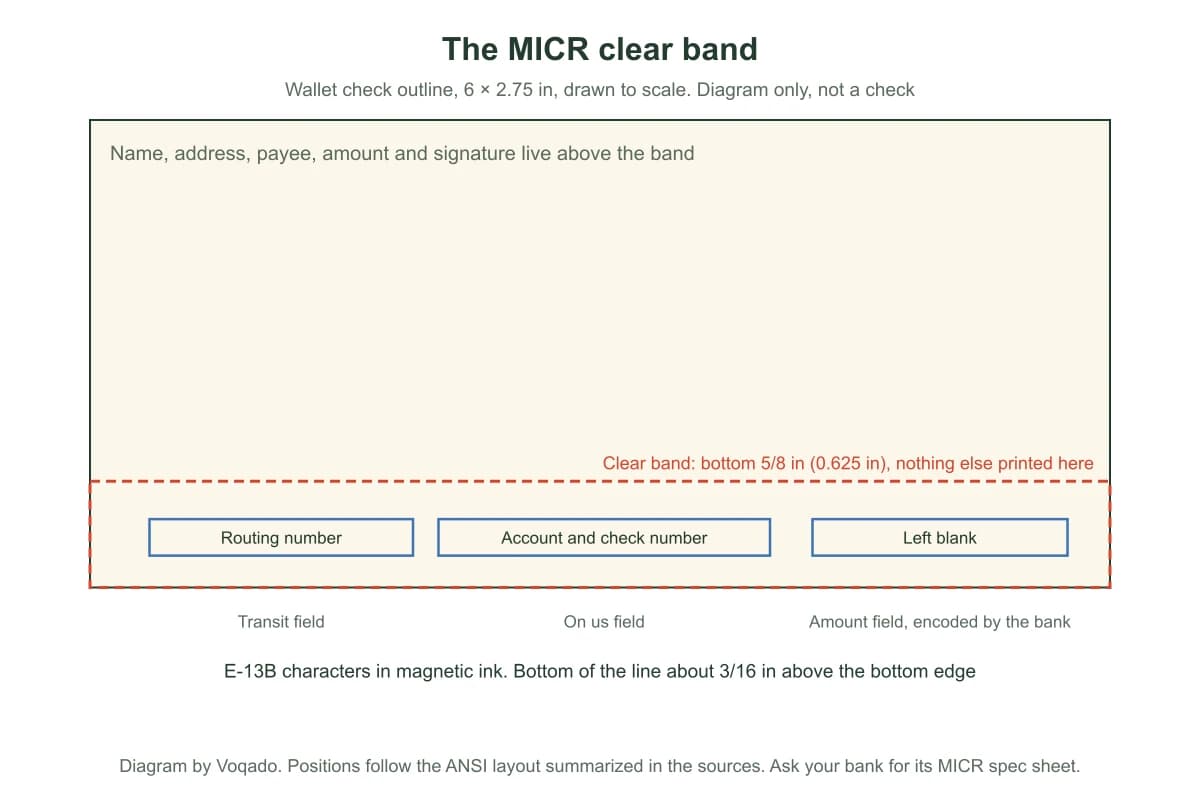
Position matters as much as the characters. The ANSI layout summarized in the TROY MICR handbook reserves a clear band, the bottom 5/8 inch of the check, for the MICR line and nothing else. The bottom of the line sits about 3/16 inch above the bottom edge. Read from left to right on a personal size check, the line holds the routing number in the transit field, then the account number and check number in the on us field, and the amount field is left blank for the bank of first deposit to encode. Checks longer than 6.5 inches can carry an extra auxiliary on us field at the far left.
The same handbook gives the size range: at least 6 inches and no more than 8.75 inches wide, at least 2.75 inches and no more than 3.66 inches tall. Voqado wallet checks are 6 × 2.75 inches, the smallest standard size.
What Check 21 means, and what it does not
The Check Clearing for the 21st Century Act lets banks exchange images instead of paper and makes a properly prepared substitute check the legal equivalent of the original. The Federal Reserve notes that electronic check records carry the MICR line data and that items can be rejected for image quality. Check 21 compliant describes how a check is printed so it survives that process. It is not a promise that any particular bank will accept any particular item, and we do not use it that way.
What Voqado prints, format by format
| Format | What it is | Stated in the specs | Bank numbers |
|---|---|---|---|
| Wallet checks | 6 × 2.75 in checkbook format, single or duplicate | No security features listed | Printed into the MICR line from the numbers you enter |
| Wallet trial checks | 25 checks from the same wallet templates | No security features listed | Same |
| Laser business checks | Loose sheets for laser and inkjet printers; multipurpose, payroll and accounts payable layouts; 50 to 2,448 checks | Check 21 compliant; tamper resistant security printing | Same |
| Three per page business checks | Three checks per sheet with tear away stubs, for office binders, single or duplicate | Check 21 compliant; tamper resistant security printing | Same |
What we do not claim: the specs do not name the MICR toner or ink, so we do not describe it. No bank has pre approved Voqado checks, and we do not say one has. Checks print from production approved templates, so you cannot upload your own logo file. FraudArmor protection is an optional add on for every format and is left off unless you choose it.
How your bank numbers get onto the checks
- Choose a format and template, then enter your routing and account numbers in the encrypted check form. You can do it on the product page, in the cart, beside the Studio check designer, or after you pay through a private link we email once if the details are still missing.
- The form strips spaces and dashes and runs the standard ABA checksum on the routing number. That catches a mistyped or swapped digit. It does not prove the account exists or belongs to you; only your bank can say that.
- You confirm that you are authorized to order checks for the account, that Voqado may ask you to show the account is yours before printing, and that bank verification can delay printing.
- Your numbers never go into artwork files or email, and the Studio preview masks the account number to its last four digits.
- The delivery clock on a check order starts when your bank details arrive. Standard delivery as soon as 6 business days from your order, production included. Your cart shows the estimated day for your quantity, and any faster delivery the item offers with its exact charge.
- Checks ship only to a physical address that matches the address printed on them. PO boxes are not supported.
Use the free routing number checker before you start if you are unsure which number is which, and read routing number vs account number if your statement shows several.
Why checks get rejected
- The routing or account number is wrong. This is the most common cause and the one only you and your bank can verify.
- The MICR line cannot be read: characters out of position, ink that is not magnetic, or something printed, stamped or stapled in the clear band.
- The check is damaged or folded through the bottom band.
- A mobile or ATM deposit image is too poor to read.
- On laser checks, your software prints the payee or amount in the wrong place because the alignment was never tested.
A rejected check is usually processed by hand, and the TROY handbook notes that banks commonly charge for that. If it happens, call your bank and ask which field failed. If the checks arrived damaged or misprinted, tell us within 30 days; because checks carry bank details, a replacement is reissued through the secure intake rather than reprinted from the original order.
For laser checks, test alignment before the first real run. Print a page on plain letter paper, hold it over a blank check against a light, and see whether the payee, amount and date fields line up. If they drift, adjust the alignment in your software print settings and test again, then enter the starting check number printed on the first sheet so your records stay in order.
Ask your bank before the first run
- Do you have a MICR specification sheet for checks from an outside printer?
- Is this the routing number for checks, or a different one for wires?
- Do you offer positive pay, and how do I send the issue file?
- Will you test deposit one check before I start paying vendors with them?
Banner Bank, for one, advises asking for a MICR spec sheet when ordering from another vendor. For the background, read what is MICR, MICR toner and ink, check security features and positive pay explained. Compare formats and prices on the checks page, or start with laser business checks if you print from accounting software.
Frequently asked questions
Do banks accept checks printed by online companies?
Yes, when the check meets the standards their equipment reads: a correctly placed MICR line in magnetic E-13B characters, a standard size between 6 and 8.75 inches wide, and your correct routing and account numbers. Banks do not keep a list of approved printers.
Are all Voqado checks Check 21 compliant?
Laser and three per page business checks are listed as Check 21 compliant with tamper resistant security printing. The specs for wallet and wallet trial checks do not state it, so we do not claim it for them.
What magnetic ink do Voqado checks use?
The product specs do not name the MICR toner or ink, so we do not state it. Your routing and account numbers are printed into the MICR line from the numbers you enter in the encrypted check form.
What if the bank rejects one of my checks?
Ask the bank which field failed. A wrong routing or account number means a new order with the right numbers. If the checks arrived damaged or misprinted, tell us within 30 days and a replacement is reissued through the secure intake.
Can my checks ship to a PO box?
No. For security, checks ship only to a physical address that matches the address printed on the checks.
Does Voqado verify my bank account?
No. The form checks that the routing number passes the ABA checksum, which catches typos, and records your authorization. You also agree that Voqado may ask you to show the account is yours before printing. Only your bank can confirm the account itself.
Sources & specification notes
The references below support the relevant technical or product details in this guide. Examples and checklists are not claims of practical testing or universal production requirements. Confirm the current specifications for your chosen product before production.
- Cornell LII: 12 CFR 229.2, Regulation CC definitions
Defines the MICR line as data printed near the bottom of a check in magnetic ink under the ANSI placement standard.
- TROY Group: MICR Basics Handbook
Manufacturer handbook summarizing the ANSI check size range (6 to 8.75 inches wide, 2.75 to 3.66 inches tall), the 5/8 inch clear band, the 3/16 inch line position and manual processing fees for rejected checks.
- MICR Gauge: About MICR and E-13B
Lists the fourteen E-13B characters and the MICR field order, and notes the auxiliary on us field appears only on checks longer than 6.5 inches.
- Rosetta Technologies: Magnetic ink still required on checks
Explains why magnetic ink is still needed after Check 21.
- Federal Reserve: Frequently Asked Questions about Check 21
Explains substitute checks and their legal equivalence.
- Federal Reserve Financial Services: Check 21 enabled services FAQ
Electronic check records carry the MICR line data, and items can be rejected for image quality.
- Banner Bank: Identifying numbers on a check
Advises requesting a MICR specification sheet when ordering checks from another vendor.